Evaluating the Financial Overview Canva Template for Your Self-Publishing Business
Navigating the financial side of a self-publishing venture on platforms like Amazon KDP requires clarity and organization. For many creators, the challenge isn't just writing or designing, but tracking income, expenses, and overall profitability in a systematic way. A product often marketed as the "Financial Overview - Canva Template" presents itself as a potential solution. This article examines what this template entails, its distinctive characteristics, and how it compares to other approaches for managing your publishing finances, helping you determine if it aligns with your specific operational needs.
What Is the Financial Overview Canva Template?
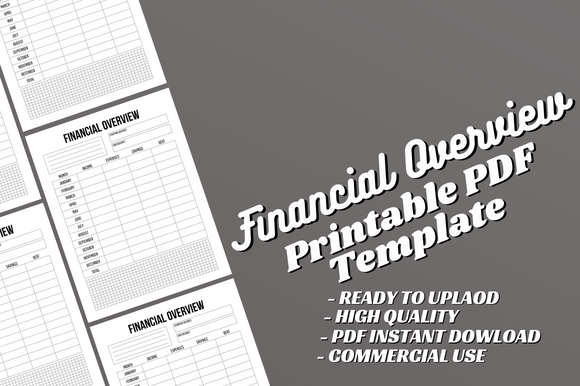
In essence, the Financial Overview Canva Template is a pre-designed digital interior file, formatted specifically for print-on-demand books. It typically includes a 120-page PDF ready for upload to Amazon KDP and an editable Canva source file. The content is structured as a yearly financial planner, bill tracker, and overview ledger, housed within an 8.5x11-inch, no-bleed format. Its core distinction is the dual-format delivery: a fixed, print-ready PDF alongside a customizable Canva file. This allows users to either use the product immediately as a published interior or modify every element—text, fonts, layouts—to create a personalized financial tracking journal before publication.
Core Features and Practical Application
The template's specifications suggest a focus on utility for the self-publisher. The 120-page length provides ample space for detailed annual tracking, moving beyond a simple monthly log. The inclusion of sections like a yearly overview and bill tracker indicates a design aimed at holistic financial capture, potentially encompassing royalty payments from multiple platforms, advertising expenses, printing costs, and other business-related bills.
The editable Canva source file is a significant feature. Canva’s user-friendly interface makes customization accessible even to those with minimal graphic design experience. You could, for example, change column headers to match your specific income streams, add sections for tracking ISBN purchases, or modify the color scheme to fit your brand. This flexibility contrasts with many pre-made KDP interiors that are static PDFs only, offering no room for adaptation without advanced software.
Strengths and Primary Use Cases
The template's strengths lie in its balance of readiness and adaptability. For a creator who wants a professional-looking financial ledger quickly but also desires personalization, this dual offering can save considerable time. Designing a 120-page formatted interior from scratch in Canva or another tool requires a non-trivial investment of effort. Having a foundational structure to modify streamlines the process.
This product likely fits best for self-publishing authors or small presses who actively monitor their business finances and wish to consolidate that tracking into a tangible, printed book—either for their own use or as a niche publication for others in the community. It serves a practical need rather than a creative one. Its value is pronounced if you prioritize having an editable file; the ability to tweak the template means the final product can evolve with your business, allowing for different editions or tailored versions for various lines of work.
Comparing Approaches: Templates Versus DIY Solutions
When considering how to create a financial ledger for KDP, several alternative paths exist, each with different tradeoffs.
One common alternative is using spreadsheet software like Excel or Google Sheets and simply printing those sheets for personal use. This approach offers maximum flexibility and computational power—automatic sums, charts, and complex formulas. The tradeoff is aesthetic and format; translating a spreadsheet into a visually pleasing, properly formatted 8.5x11 book interior requires significant design work. The Financial Overview Canva Template addresses the design hurdle but lacks the automated calculation features of a true spreadsheet.
Another route is purchasing or downloading static PDF interiors. These are often cheaper but are "locked." If the layout doesn't perfectly suit your needs, you must work within its constraints. The editable Canva component of the Financial Overview template provides a middle ground, offering a starting design you can alter without needing to hire a designer or learn more complex software like Adobe InDesign.
A third option is commissioning a custom design. This is ideal if you have very specific functional and brand requirements. However, it is the most costly and time-intensive path. The Financial Overview Canva Template can be seen as a cost-effective bridge between a generic static PDF and a fully custom design, granting a degree of customization at a lower investment.
Understanding the Limitations and Key Decision Factors
It is important to recognize the template's scope. The product is an *interior only*, meaning you must create and supply your own cover design before uploading to KDP. This is a standard practice in the KDP template market, but it adds another task to your workflow. Furthermore, while Canva is versatile, its editing capabilities have boundaries. Extremely complex layouts or specific typographic requirements might be difficult to achieve within the platform's framework.
The "no bleed" specification indicates the template is designed for interiors where graphics and color do not extend to the edge of the page, typical for text-heavy journals. This is a practical format choice but limits dramatic, full-page colored designs.
Deciding whether this template is right for you hinges on a few factors. First, assess your need for customization. If you want a standard financial tracker with no changes, a simpler, static PDF might suffice. If you want to insert your own branding, adjust categories, or potentially translate the content into another language, the editable file becomes valuable. Second, consider your comfort with Canva. If you are unfamiliar with the tool, you must weigh the time to learn it against the customization benefits. Third, evaluate the importance of integrated calculations. This template is a logbook, not a dynamic calculator. If you need automated running totals, a hybrid approach—using a spreadsheet for computation and then transferring finalized data into the template for printing—might be necessary.
When This Template May Be the Right Choice
The Financial Overview Canva Template aligns well with specific scenarios. If you are an author-publisher who already uses Canva for other marketing or design tasks, adding this template to your workflow creates consistency and leverages existing skills. It is also a strong fit if you plan to publish multiple variations of financial planners—for example, a general version and a version tailored for textbook authors—as the source file allows for efficient replication and modification.
It serves a practical purpose for those who prefer a physical, bound record over digital files. The act of writing entries can reinforce financial awareness, and a dedicated book separates business tracking from other digital clutter. Furthermore, if you are exploring creating products for the "self-publishing tools" niche on KDP itself, this editable interior can be a starting point for your own product line, allowing you to adapt and sell a derivative financial tracking journal.
When You Might Need a Different Option
There are clear situations where an alternative solution would be more effective. If your financial tracking is highly complex, involving numerous currencies, real-time tax calculations, or integration with accounting software, a dedicated digital app or spreadsheet system is indispensable. The template then might serve only as a supplementary archive for finalized annual summaries.
If design customization is not a priority at all, the editable feature holds little value, and a less expensive, ready-to-upload PDF could meet your needs without the extra step of modifying in Canva. Similarly, if you require a bleed design for a more artistic interior, this no-bleed template would not be suitable without substantial redesign work that might be easier to accomplish in a different design program from the outset.
Finally, if you lack the time or inclination to handle any design tasks—including cover creation—a full-service design package or a complete book (cover and interior) from another provider might represent a more streamlined, albeit more expensive, path.
Making an Informed Decision for Your Project
Choosing resources for your self-publishing business involves balancing time, cost, functionality, and personal skill. The Financial Overview Canva Template occupies a particular niche: it is a functional, customizable starting point for a printed financial log. Its value is not universal but situational. By honestly assessing your need for adaptability, your preferred workflow between digital and physical records, and the complexity of the financial data you manage, you can better judge if this product's blend of a ready-made PDF and an editable Canva file solves a genuine problem for you or if your requirements point toward a different tool entirely. In the end, the most effective financial overview system is one you will consistently and accurately use, whether it emerges from this template, a spreadsheet, or another method tailored to your specific operational habits.